Use Cases
Role TrackerI want to identify users who have been granted excessive authorizations.
The SAP ERP system provides a powerful and flexible authorization framework.
However, due to the complexity of its structure—including users, menus, composite/single roles, composite/single profiles, authorization classes/objects/values, and T-Codes—managing it effectively often requires deep expertise.
OWLens offers the Role Tracker feature, which helps simplify this complexity by visualizing the relationships between authorization components through statistics and diagrams.
This allows administrators to easily track, understand, and assess potentially excessive or inappropriate authorization assignments.
The Role Tracker is available in two main functions: Summary (statistics), Search (diagram)
You can access them via:
Main Menu → Analytics/Statistics → Analysis → Role Tracker Summary / Role Tracker Search
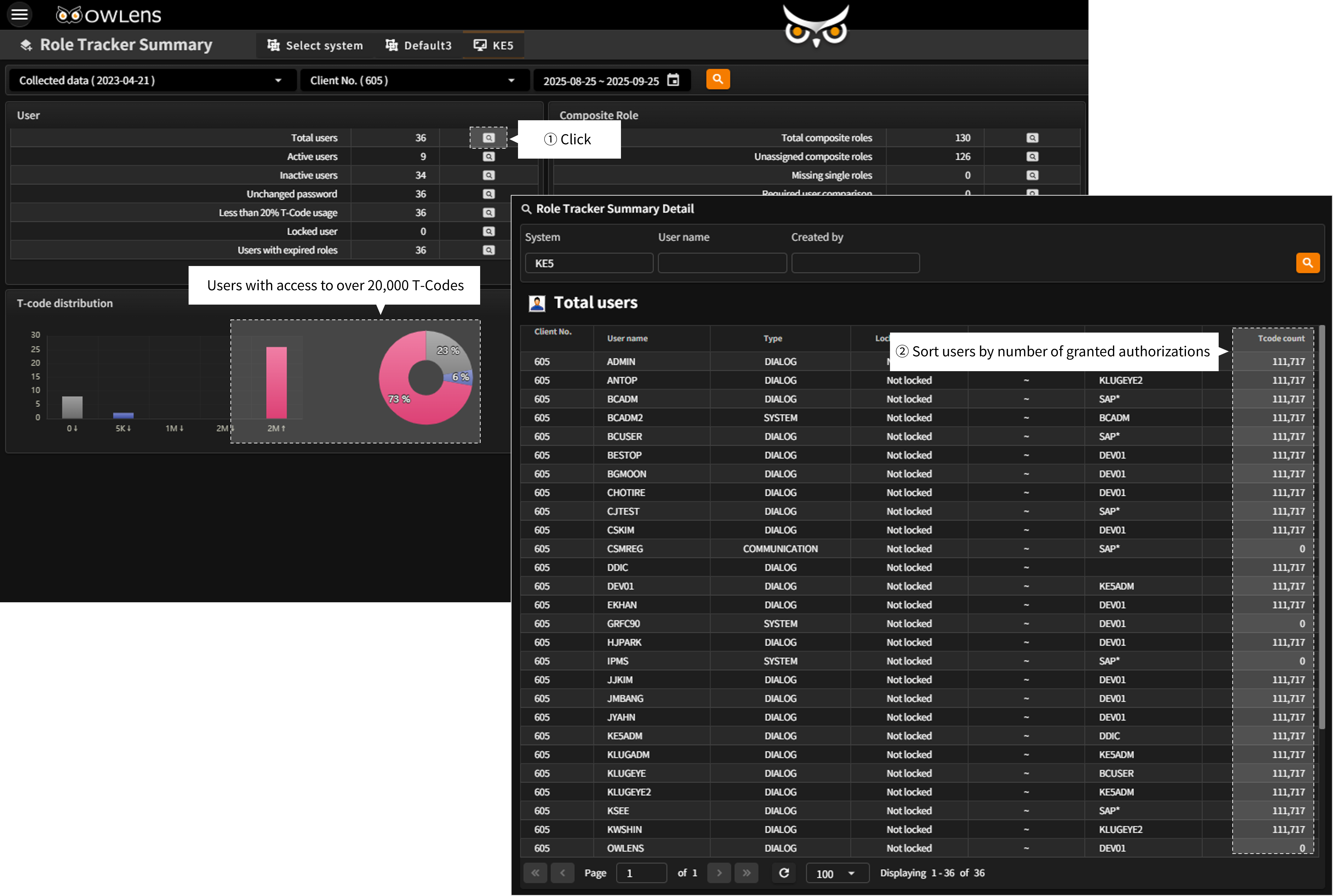
- Under Role Tracker Summary screen, OWLens provides visualized charts that highlight users with excessive authorizations—specifically those who have access to an excessively large number of T-Codes.
- From the User Statistics section, clicking the button on the right side of the “Total Users” row opens a detailed view showing the number of T-Codes assigned to each user.
- You can sort by the “T-code Count” column to quickly identify users who have been granted the most extensive access.
- Proactively prevent security risks by detecting excessive authorizations.
- Compare and analyze authorization assignments over time to ensure proper access control.